


Building AI agents is getting easier. Deploying them as part of a real application, with multiple services, persistent state, and production infrastructure, is where things get complicated. Developers from the .NET community have requested whether a real-world example that shows running on local machine as well as on the cloud in a cloud-native way.
We’ve heard you! We built an open-source Interview Coach sample to show how Microsoft Agent Framework, Microsoft Foundry, Model Context Protocol (MCP), and Aspire fit together in a production-style application. It’s a working interview simulator where an AI coach walks you through behavioral and technical questions, then delivers a summary of your performance.
This post covers the patterns we used and the problems they solve.
Here’s the link to visit the Interview Coach demo app.
Why Microsoft Agent Framework?
If you’ve been building AI agents with .NET, you’ve probably used Semantic Kernel, AutoGen, or both. Microsoft Agent Framework is the next step. It’s built by the same teams and combines what worked from both projects into a single framework.
It takes AutoGen’s agent abstractions and Semantic Kernel’s enterprise features (state management, type safety, middleware, telemetry) and puts them under one roof. It also adds graph-based workflows for multi-agent orchestration.
For .NET developers, this means:
- One framework instead of two. No more choosing between Semantic Kernel and AutoGen.
- Familiar patterns. Agents use dependency injection,
IChatClient, and the same hosting model as ASP.NET apps. - Built for production. OpenTelemetry, middleware pipelines, and Aspire integration are included.
- Multi-agent orchestration. Sequential workflows, concurrent execution, handoff patterns, and group chat are all supported.
The Interview Coach puts all of this into a real application, not just a Hello World.
Why Microsoft Foundry?
AI agents need more than a model. They need infrastructure. Microsoft Foundry is Azure’s platform for building and managing AI applications, and it’s the recommended backend for Microsoft Agent Framework.
Foundry gives you a single portal for:
- Model access. A catalog of models from OpenAI, Meta, Mistral, and others, all through one endpoint.
- Content safety. Built-in moderation and PII detection so your agents don’t go off the rails.
- Cost-optimized routing. Requests get routed to the best model for the job automatically.
- Evaluation and fine-tuning. Measure agent quality and improve it over time.
- Enterprise governance. Identity, access control, and compliance through Entra ID and Microsoft Defender.
For the Interview Coach, Foundry provides the model endpoint that powers the agents. Because the agent code uses the IChatClient interface, Foundry is just a configuration choice, but it’s the one that gives you the most tooling out of the box.
What does the Interview Coach do?
The Interview Coach is a conversational AI that runs a mock job interview. You provide a resume and a job description, and the agent takes it from there:
- Intake. Collects your resume and the target job description.
- Behavioral interview. Asks STAR-method questions tailored to your experience.
- Technical interview. Asks role-specific technical questions.
- Summary. Generates a performance review with specific feedback.
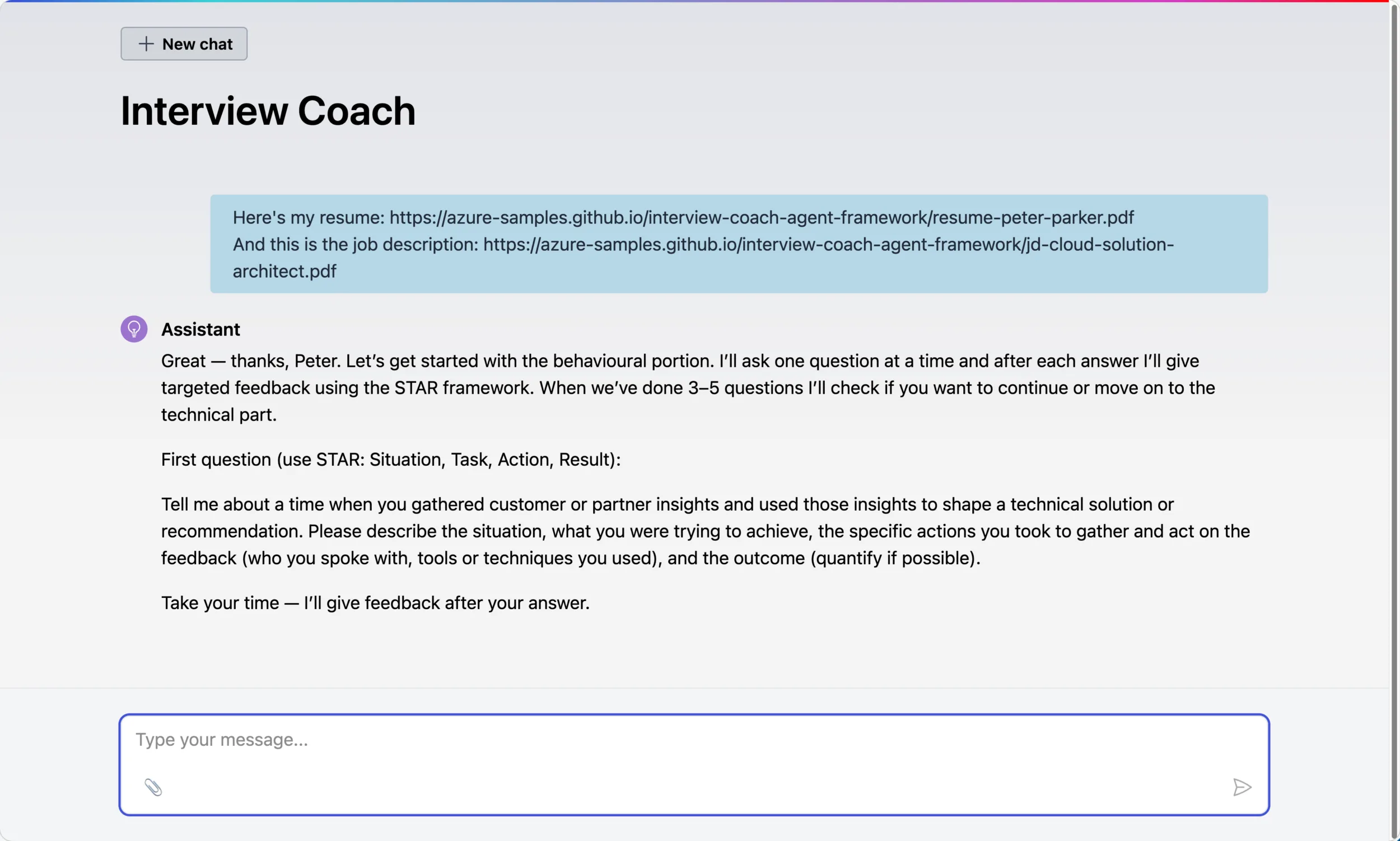
You interact with it through a Blazor web UI that streams responses in real time.
Architecture at a glance
The application is split into several services, all orchestrated by Aspire:
-
- LLM Provider. Microsoft Foundry (recommended) for different model access.
- WebUI. Blazor chat interface for the interview conversation.
- Agent. The interview logic, built on Microsoft Agent Framework.
- MarkItDown MCP Server. Parses resumes (PDF, DOCX) into markdown via Microsoft’s MarkItDown.
- InterviewData MCP Server. A .NET MCP server that stores sessions in SQLite.
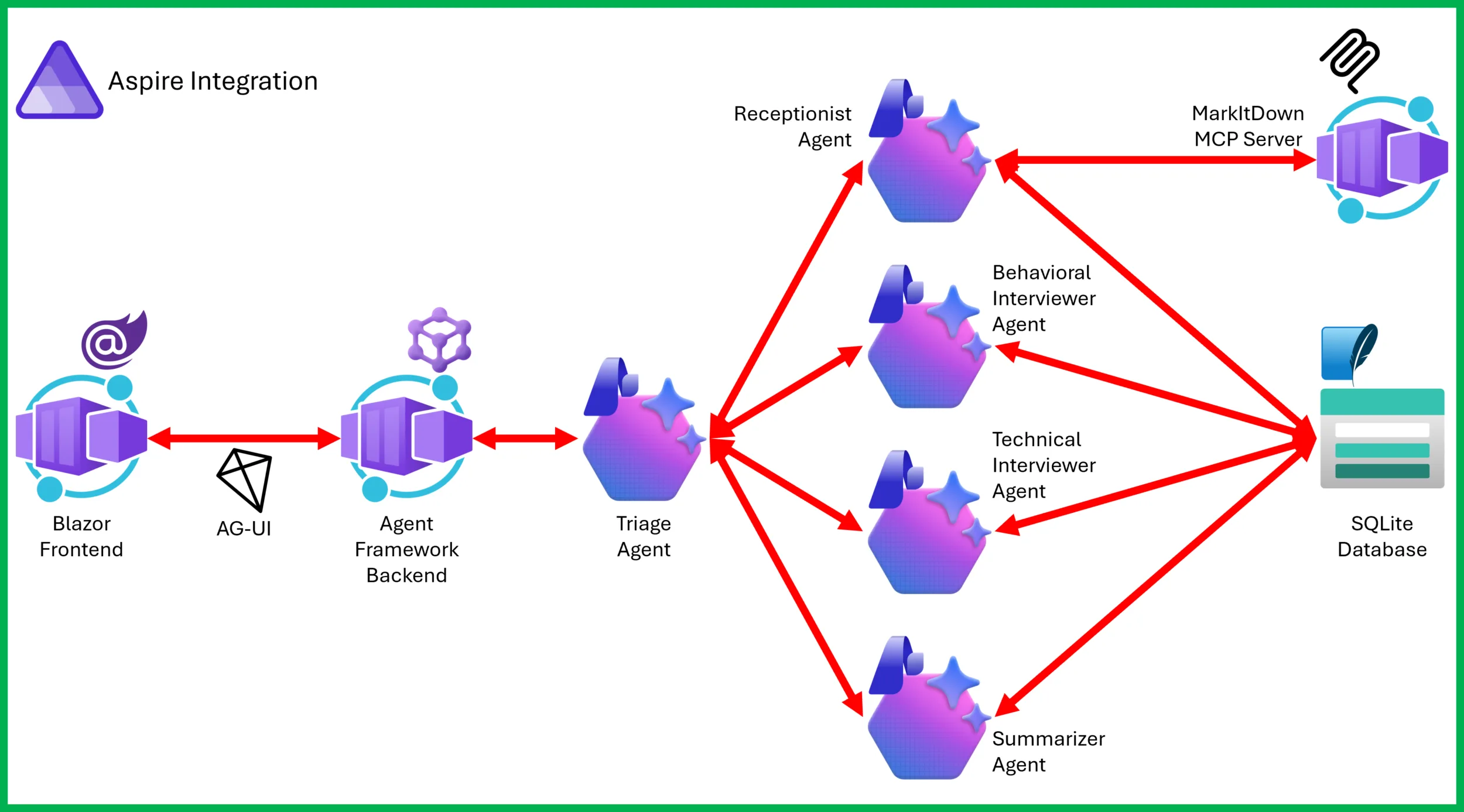
Aspire handles service discovery, health checks, and telemetry. Each component runs as a separate process, and you start the whole thing with a single command.
Pattern 1: Multi-agent handoff
The handoff pattern is where this sample gets interesting. Instead of one agent doing everything, the interview is split across five specialized agents:
| Agent | Role | Tools |
|---|---|---|
| Triage | Routes messages to the right specialist | None (pure routing) |
| Receptionist | Creates sessions, collects resume and job description | MarkItDown + InterviewData |
| Behavioral Interviewer | Conducts behavioral questions using the STAR method | InterviewData |
| Technical Interviewer | Asks role-specific technical questions | InterviewData |
| Summarizer | Generates the final interview summary | InterviewData |
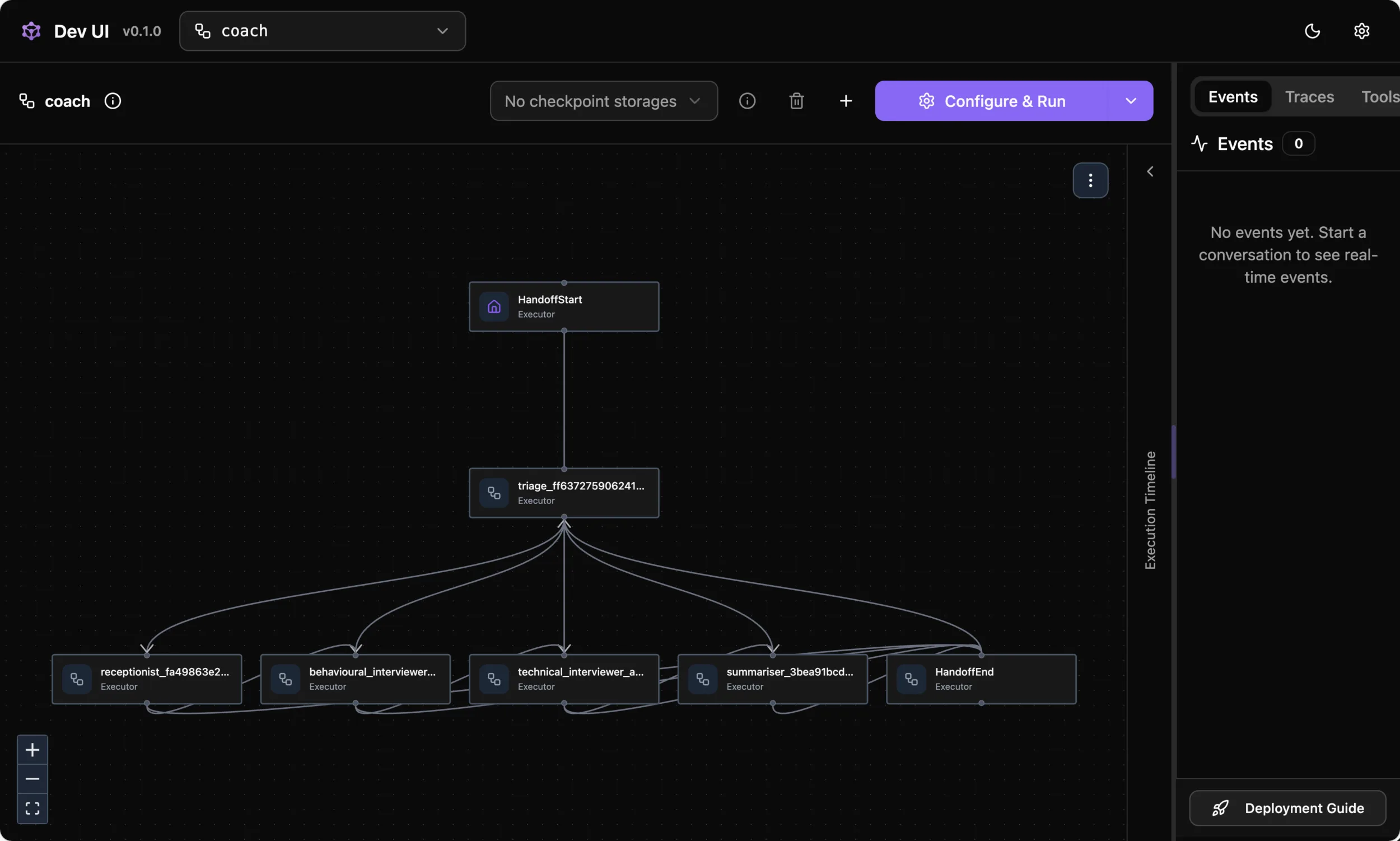
In the handoff pattern, one agent transfers full control of the conversation to the next. The receiving agent takes over entirely. This is different from “agent-as-tools,” where a primary agent calls others as helpers but retains control.
Here’s how the handoff workflow is wired up:
var workflow = AgentWorkflowBuilder
 .CreateHandoffBuilderWith(triageAgent)
 .WithHandoffs(triageAgent, [receptionistAgent, behaviouralAgent, technicalAgent, summariserAgent])
 .WithHandoffs(receptionistAgent, [behaviouralAgent, triageAgent])
 .WithHandoffs(behaviouralAgent, [technicalAgent, triageAgent])
 .WithHandoffs(technicalAgent, [summariserAgent, triageAgent])
 .WithHandoff(summariserAgent, triageAgent)
 .Build();
The happy path is sequential: Receptionist → Behavioral → Technical → Summarizer. Each specialist hands off directly to the next. If something goes off-script, agents fall back to Triage for re-routing.
The sample also includes a single-agent mode for simpler deployments, so you can compare the two approaches side by side.
Pattern 2: MCP for tool integration
Tools in this project don’t live inside the agent. They live in their own MCP (Model Context Protocol) servers. The same MarkItDown server could power a completely different agent project, and tool teams can ship independently of agent teams. MCP is also language-agnostic, which is how MarkItDown runs as a Python server while the agent is .NET.
The agent discovers tools at startup through MCP clients and passes them to the appropriate agents:
var receptionistAgent = new ChatClientAgent(
 chatClient: chatClient,
 name: "receptionist",
 instructions: "You are the Receptionist. Set up sessions and collect documents...",
 tools: [.. markitdownTools, .. interviewDataTools]);
Each agent only gets the tools it needs. Triage gets none (it just routes), interviewers get session access, and the Receptionist gets document parsing plus session access. This follows the principle of least privilege.
Pattern 3: Aspire orchestration
Aspire ties everything together. The app host defines the service topology: which services exist, how they depend on each other, and what configuration they receive. You get:
- Service discovery. Services find each other by name, not hardcoded URLs.
- Health checks. The Aspire dashboard shows the status of every component.
- Distributed tracing. OpenTelemetry wired up through shared service defaults.
- One-command startup.
aspire run --file ./apphost.cslaunches everything.
For deployment, azd up pushes the entire application to Azure Container Apps.
Get started
Prerequisites
- .NET 10 SDK or later
- Azure Subscription
- Microsoft Foundry project
- Docker Desktop or other container runtime
Run it locally
git clone https://github.com/Azure-Samples/interview-coach-agent-framework.git
cd interview-coach-agent-framework

# Configure credentials
dotnet user-secrets --file ./apphost.cs set MicrosoftFoundry:Project:Endpoint "<your-endpoint>"
dotnet user-secrets --file ./apphost.cs set MicrosoftFoundry:Project:ApiKey "<your-key>"

# Start all services
aspire run --file ./apphost.cs
Open the Aspire Dashboard, wait for all services to show as Running, and click the WebUI endpoint to start your mock interview.
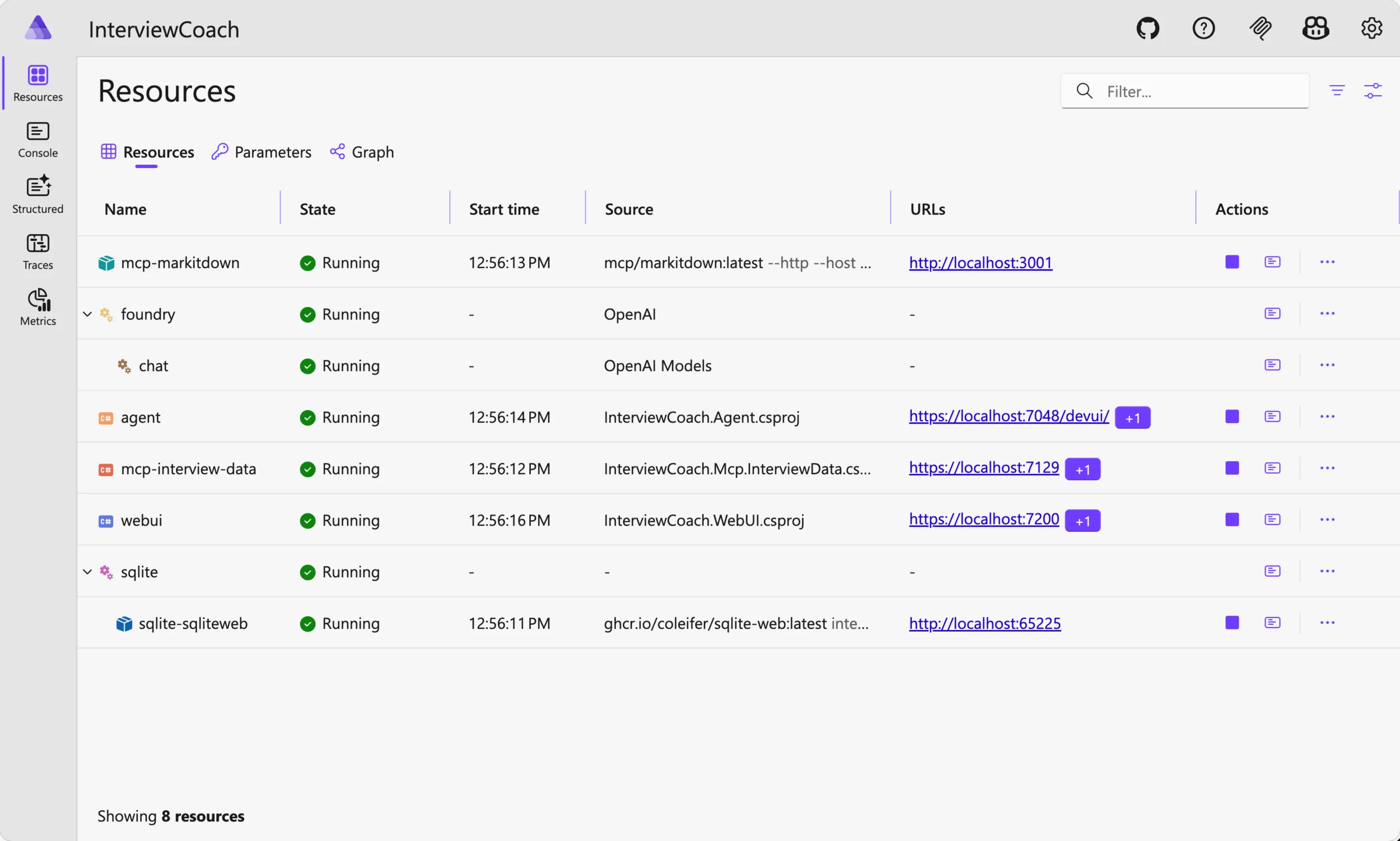
Here’s how the handoff pattern works – visualized on DevUI.
You can use this chat UI to interact with the agent as the interview candidate.
Deploy to Azure
azd auth login
azd upazd handle the rest. Once you complete deployment and testing, you can safely delete all the resources by running:azd down --force --purgeWhat you’ll learn from this sample
After working through the Interview Coach, you’ll have seen:
- Using Microsoft Foundry as the model backend
- Building single-agent and multi-agent systems with Microsoft Agent Framework
- Splitting workflows across specialized agents with handoff orchestration
- Creating and consuming MCP tool servers independently of agent code
- Orchestrating multi-service applications with Aspire
- Writing prompts that produce consistent, structured behavior
- Deploying everything with
azd up
Try it out
The full source is on GitHub: Azure-Samples/interview-coach-agent-framework
If you’re new to Microsoft Agent Framework, start with the framework documentation and the Hello World sample. Then come back here to see how the pieces fit in a larger project.
If you build something with these patterns, open an issue and tell us about it.
See it live!
Watch the live stream on the .NET AI Community Standup to see Bruno Capuano and Justin Yoo demo it and answer your questions live!
What’s next?
We’re working on more integration scenarios: Microsoft Foundry Agent Service, GitHub Copilot, and A2A and ore. We’ll update the sample as they ship.
Resources
- Microsoft Agent Framework documentation
- Introducing Microsoft Agent Framework preview
- Microsoft Agent Framework Reaches Release Candidate
- Microsoft Foundry documentation
- Microsoft Foundry Agent Service
- Microsoft Foundry Portal
- Microsoft.Extensions.AI
- Model Context Protocol specification
- Aspire documentation
- ASP.NET Blazor


@Justin Hoo – This is a great sample. I have a question regarding workflow handoff compatibility with GitHub Copilot SDK as a provider. I see that the code is commented out so curious to understand if it had been working. I tried to use GitHub Copilot provider and uncommented the code but the handoffs weren’t happening? The triage agent was generating the responses alone.
my understanding is that with GitHubCopilot these would be custom agent definitions and each with their own session config which includes these prompts and mcp servers?
@Shray We’re finalising the sample codes using GitHub Copilot SDK. Please stay tuned!
Looks great !
But I have an issue (ubuntu/dotnet components fresh install this morning)
Logs are :
2026-03-25 12:57:48.637] [INFO] [AppHost] Aspire.Hosting.DistributedApplicationException: Une version plus récente du package Aspire.Hosting.AppHost est nécessaire pour exécuter
l’application. Vérifiez que vous référencez au moins la version « 13.2.0 ».
[2026-03-25 12:57:48.638] [INFO] [AppHost] at Aspire.Hosting.Dcp.DcpDependencyCheck.EnsureDcpVersion(DcpInfo dcpInfo) in /_/src/Aspire.Hosting/Dcp/DcpDependencyCheck.cs:line 1
66
[2026-03-25 12:57:48.638] [INFO] [AppHost] at Aspire.Hosting.Dcp.DcpDependencyCheck.GetDcpInfoAsync(Boolean force, CancellationToken cancellationToken) in /_/src/Aspire.Hostin
g/Dcp/DcpDependencyCheck.cs:line 108
Says I need at least version 13.2.0
I forced under...
Hi Justin, This looks like a really interesting project. I have been trying to run it unsuccessfully for a few days now. I thought it was because I was on Linux but I have the same issues on Windows.
aspire: command not found
I was running .NET 10 and tried running dotnet add package Aspire.Hosting.AppHost on the AppHost project but it gave the same error.
I was able to run dotnet run but I want to be able to debug, and I am getting a timeout issue when running after asking a question.
Any help appreciated.
Hi, Stuart. Apparently, there are a few issues combined together.
1. Would you please be able to check your Aspire version? It should be 13.1.2 or higher.
2. Would you please be able to install the Aspire CLI? https://aspire.dev/get-started/install-cli/
3. Would you please be able to run the sample app on GitHub Codespaces?
Let’s start from there.
What a great way to use Agent Framework and Microsoft Foundry. Thanks for the great demo Justin (and also Bruno :))
Thanks Arafat. If you find anything interesting while running this demo, please let us know!