

You shipped a new CLI: better developer experience, modern architecture, and optimized for agents. You deprecated the old one, updated the docs, and blogged about it. Developers are migrating. Then someone asks an AI coding agent to scaffold a project, and the agent… uses the old tool.
Training data gravity
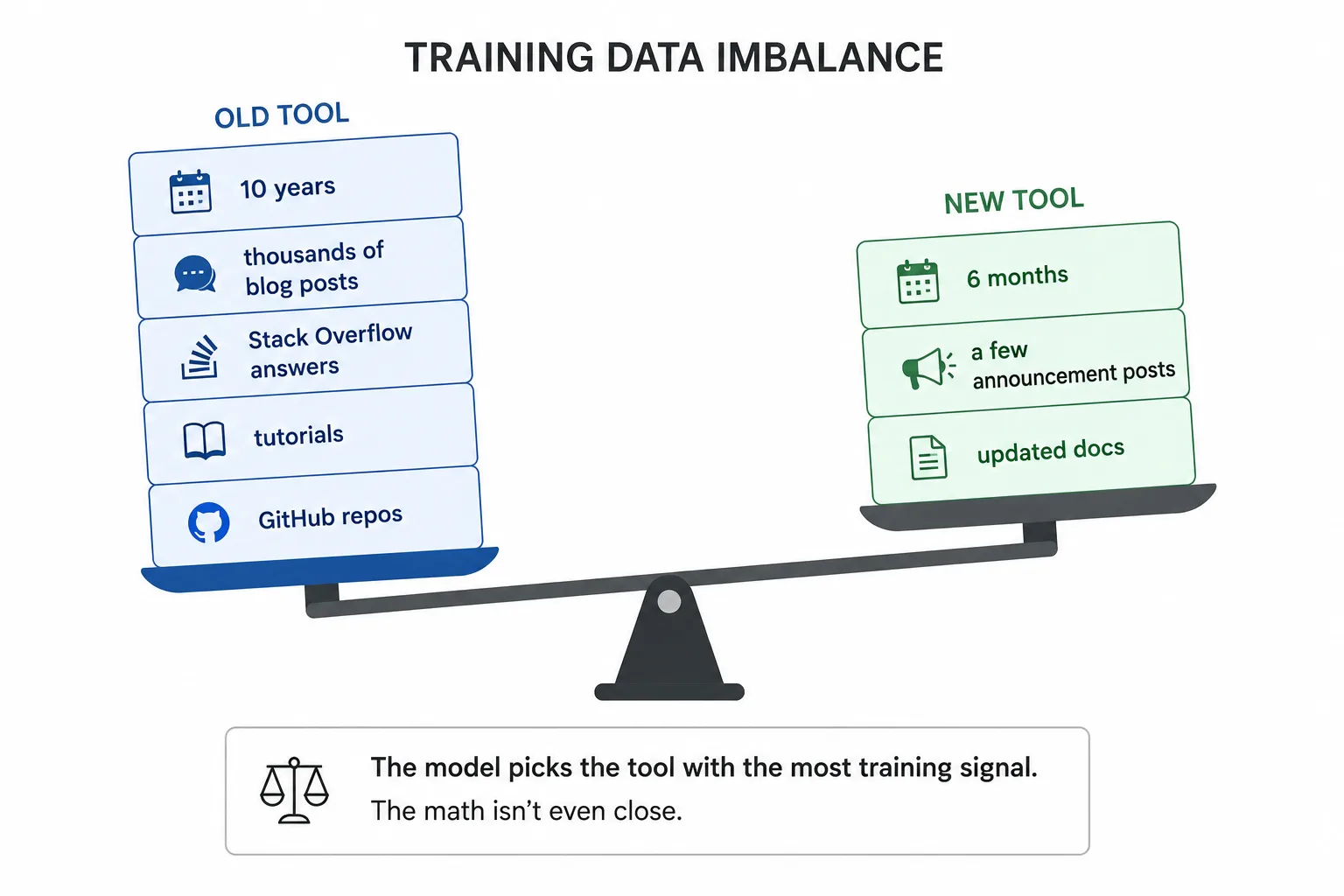
Models learn from the internet. If your technology has been around for a decade, there are thousands of blog posts, Stack Overflow answers, tutorials, and GitHub repos that document the old way of doing things. Your new CLI? A handful of announcement posts and maybe some updated docs.
So what happens when a developer asks an agent to scaffold a project? The model reaches into its training data for the most likely tool. Because of the substantial training corpus, it’s pretty confident that it can do the job on its own.
It doesn’t look up the latest docs. It doesn’t check release dates or compare deprecation notices. It defaults to what it knows best: the old tool. Ten years of content versus 6 months. The math isn’t even close.
This isn’t hypothetical. We’ve seen it across multiple platform teams at Microsoft. The SharePoint Framework (SPFx) team came to us specifically to evaluate this risk as they prepare a new standalone CLI to replace their long-running Yeoman-based generator. They wanted to know, before shipping broadly, whether agents would actually pick up the new tool.
The answer was clear: when we pointed an agent at a scaffolding task, it ignored the new CLI entirely. It went straight for the Yeoman generator, constructed the yo @microsoft/sharepoint command from memory, and moved on. Even when we explicitly told it to use the new tool, the agent concluded we were being imprecise and defaulted to the generator.
The agent wasn’t broken. It was doing exactly what its training data said to do. Every tutorial, every conference talk, every “getting started” post says to use Yeoman. The new CLI barely registers against that volume.
It’s not a naming problem (but naming makes it worse)
Tools with distinctive names don’t have this problem. Nobody confuses Vite with webpack, or Bun with npm. The name itself creates a separate slot in the model’s knowledge.
But what happens when your new tool has a name that reads as a description of the category (“the v2 CLI,” “the new SDK”)? The model collapses it into the same concept as the predecessor and picks the one it knows best.
This is a common pattern. If your new tool is called “[Platform] CLI,” the model maps that phrase to whatever existing tool already fits the description. In ecosystems with multiple tools: an official generator, a community CLI, maybe a legacy standalone tool, the model picks the one with the most training data, regardless of which one you meant. Three tools with overlapping vocabulary, and one clear winner.
The model doesn’t distinguish between “the old way” and “the new way” unless the signal is strong enough to override the prior. A distinctive name helps create that signal. A descriptive name works against it.
The model considers and rejects
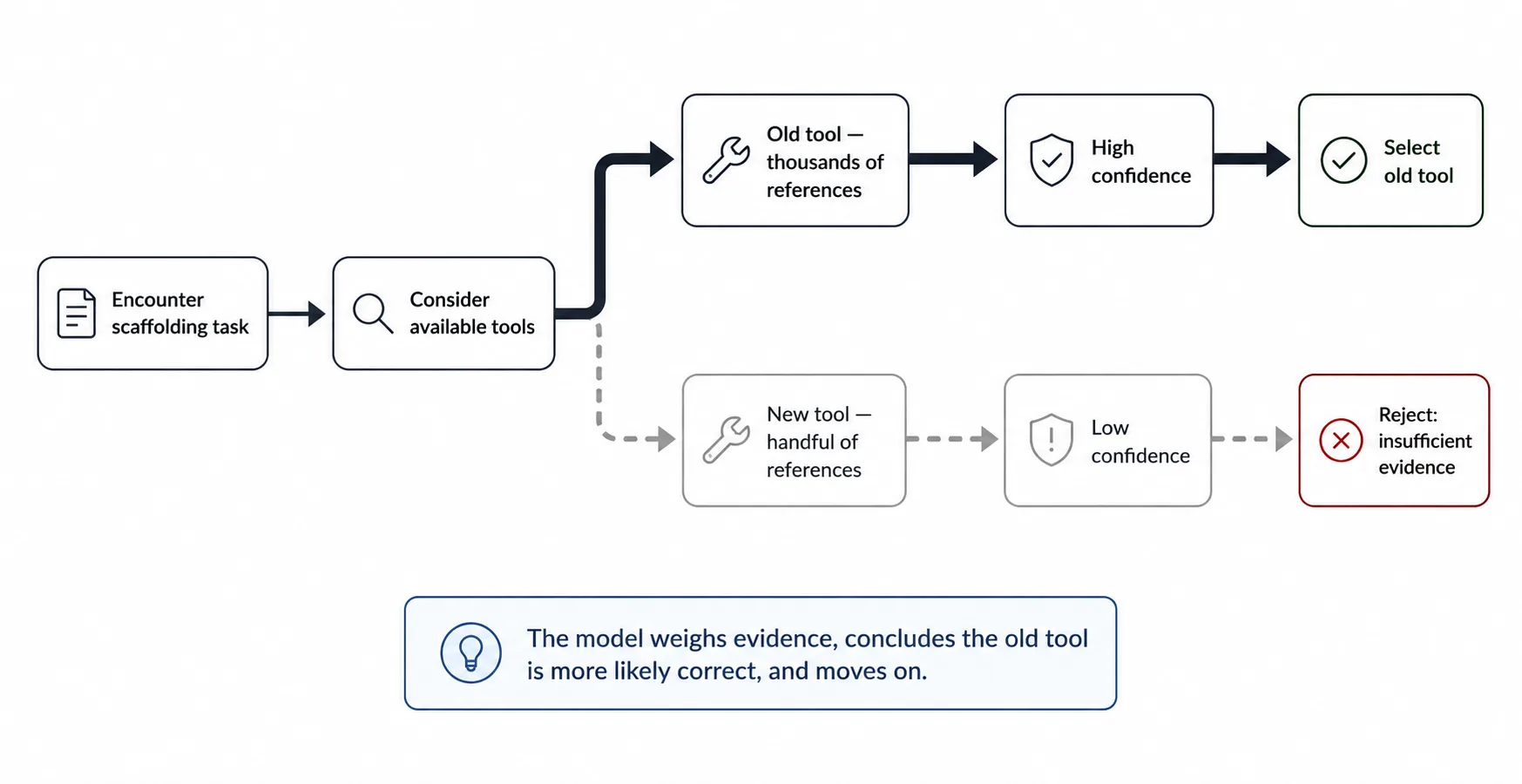
Here’s what makes this hard to debug. The model doesn’t blindly pick the old tool. In many cases, it considers the new tool, then talks itself out of it.
We’ve seen this in agent reasoning traces. In one evaluation, the model’s internal reasoning went roughly like this:
“The [Platform] CLI typically refers to [established tool]. I’m wondering if a standalone CLI tool has been released, but the standard approach remains using [established tool].”
The model thought there might be something new. It considered the possibility, couldn’t find enough signal to confirm it, and defaulted to the strongest prior.
That’s the worst outcome. The model weighs evidence, concludes that the old tool is more likely correct, and moves on. Given its training data, that conclusion is rational. The model is doing its job. It’s just working with stale data, and in our test case, there were no instructions to tell it to look past what it knows.
What you can do about it
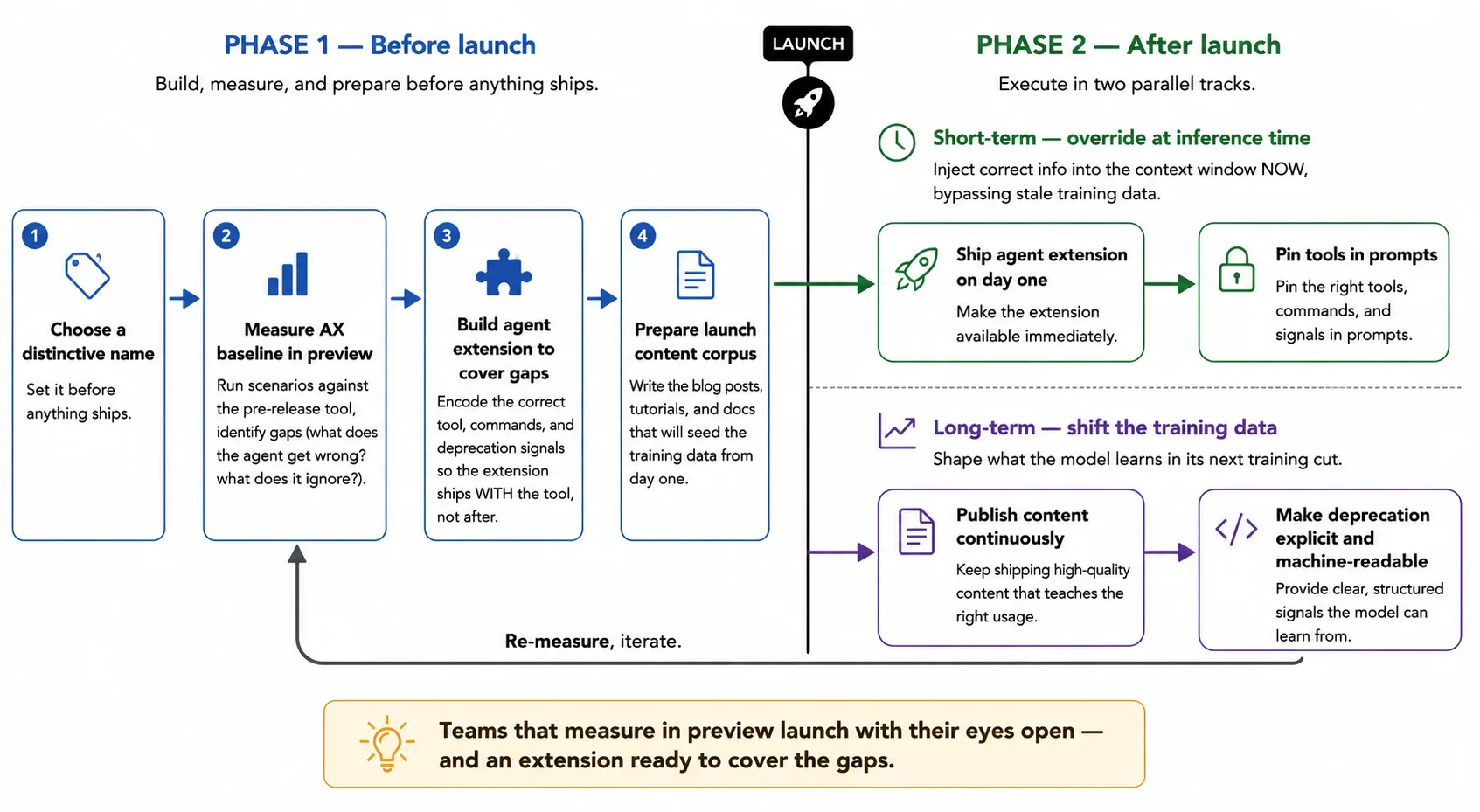
How do you even find out this is happening? You measure it. The SPFx team partnered with us specifically to run controlled evaluations across scaffolding scenarios before their new CLI ships broadly. That kind of proactive measurement is what separates “we think agents work with our tech” from “we have data.”
Here’s what we’ve learned from working with them and other platform teams on similar problems.
Ship an agent extension on day one
Don’t wait for training data to accumulate. The model won’t learn about your new CLI until the next training cut, and even then, you don’t control when that happens or what information the model provider will use. What you can control is the inference-time context.
Ship a skill, an MCP server, or an instruction file that tells the agent about your new tool. Include the exact command, the correct parameters, and an explicit note that it replaces the old tool. This puts the information directly into the context window, where it overrides training data. Before you do though, measure the baseline to understand what you’re up against, and what you should include in the extension to fix it.
This is the approach we’re taking with several platform teams, including SPFx: building agent extensions that encode the new tool so agents don’t have to rely on training data that hasn’t caught up yet.
Make the deprecation explicit and machine-readable
Docs written for humans say things like “We recommend using the new CLI.” Agents need something sharper. In your instruction files, tool descriptions, and documentation, state the replacement directly:
DEPRECATED: Do not use `yo @microsoft/sharepoint`.
Use the SPFx CLI (`spfx create`) instead.
The negation matters. Models respond to explicit “do not use X” instructions more reliably than to positive-only “use Y instead” guidance. Both together is strongest.
Choose a distinctive name
If you’re still in the naming phase, pick something that doesn’t read as a description of the category. A name like “[Platform] CLI” competes semantically with every other tool in that ecosystem. A distinctive name, think Vite, Bun, Deno, creates its own slot in the model’s vocabulary and reduces the chance of semantic collapse with the predecessor.
If the name is already shipped, you can still mitigate this through your agent extensions. Tool descriptions and skill definitions can explicitly disambiguate: “NewTool (the newtool command, NOT the legacy oldtool generator).”
Front-load content for the next training cut
Models will eventually learn about your new tool, but only if there’s enough indexed content. Every blog post, tutorial, and Stack Overflow answer that uses the new CLI is training signal for the next model.
The content you publish for the launch (and in the first 6 months after) shapes how the next generation of models sees your tool. Ensure that your most important content and samples use the new CLI exclusively. Where relevant, update existing content to mention the new CLI and deprecate the old one.
The math is simple: the more content documents the new way, the faster the training data balance tips. If you’re a platform team, coordinate with your community, DevRel, and docs teams to produce content that uses the new tool exclusively.
Pin versions and tools in prompts
Until the model catches up, developers can work around the problem by being explicit in their prompts. “Scaffold an SPFx project using the SPFx CLI (spfx create)” is better than “scaffold an SPFx project.” It nudges the agent toward the right tool.
The thing is though, that you don’t control what every developer out there types into their prompts. And prompting effectively shouldn’t require using special keywords, so while this is an option, you should neither rely on it nor require it for your success.
It’s not just about CLIs
This issue applies to any technology transition where a new tool coexists with an established predecessor:
- new SDK versions that change the API surface
- framework migrations (class components → hooks, Options API → Composition API)
- build tool replacements (webpack → Vite, Grunt → modern task runners)
- authentication flow updates (implicit grant → PKCE)
In each case, the model’s training data is weighted toward the old approach. The new approach exists but doesn’t have enough signal to overcome the prior. And the agent confidently uses the old thing, because confidence is proportional to training data volume, not to recency.
There’s a related trap on the runtime side too. In Your agent just scaffolded a project from 2020, we covered how npm’s engine resolution can silently give agents old package versions even when the model knows the right one. Here, the mechanism is different: the model itself picks the old tool. Same outcome, different cause, and both require explicit intervention to fix.
What this means for you
When picking tools, models are making a rational inference from the data they have. The problem is that the data lags reality by months or years, and the model can’t tell the difference between “widely documented” and “current.”
If you’re replacing an established tool, assume the model will keep reaching for the old one. Verify this by measuring the baseline behavior, and build agent extensions that put the replacement directly into the context window. Make deprecation signals explicit and machine-readable. And measure whether agents actually use the new tool, because you won’t know they’re ignoring it until you check.
The teams that catch this are the ones that measure before it becomes a problem. If you build developer tools, you should be measuring too. That’s the only true way to know what the agent experience is for your technology. Evaluate things.


0 comments
Be the first to start the discussion.