

This is the fourth article in a series about Agent Experience (AX): the practice of making AI coding agents work correctly with your technology. The series covers what you can and can’t control in the agent stack, how to measure whether your extensions are helping or hurting, and how to iterate toward better outcomes.
You shipped your extension, measured it, confirmed it creates lift. Then a developer installs it alongside 14 other extensions, and outcomes get worse. Not because your extension is broken, but because extensions don’t exist in isolation: they compete.
In the previous article, we covered how to measure whether a single extension creates lift or drag. That measurement assumed a clean environment: your extension, and nothing else. Real developer workspaces don’t look like that. Real workspaces have MCP servers for their cloud provider, instruction files from their team, skills from their framework, and whatever’s trending on social this week. The question really isn’t whether your extension works, it’s whether it works well with others.
More extensions, worse outcomes
It seems like extensions should be additive: extension A improves authentication code, extension B improves database queries. Install both, get better auth and better queries. Right? Not quite.
Every extension consumes tokens in the context window just by being installed. Tool descriptions and skill definitions take up space before you even type a prompt. A single MCP server with 8 tools might add 2,000 tokens of tool descriptions. Five MCP servers? That’s 10,000 tokens of tool descriptions alone, and you haven’t asked anything yet. The context window is a fixed budget. Every token spent on tool descriptions is a token not spent on workspace context or conversation history. Install enough extensions and the harness starts making cuts: summarizing tool descriptions, dropping tools it deems irrelevant, and truncating whatever doesn’t fit. Your carefully written tool description might get compressed into something the model can barely interpret.
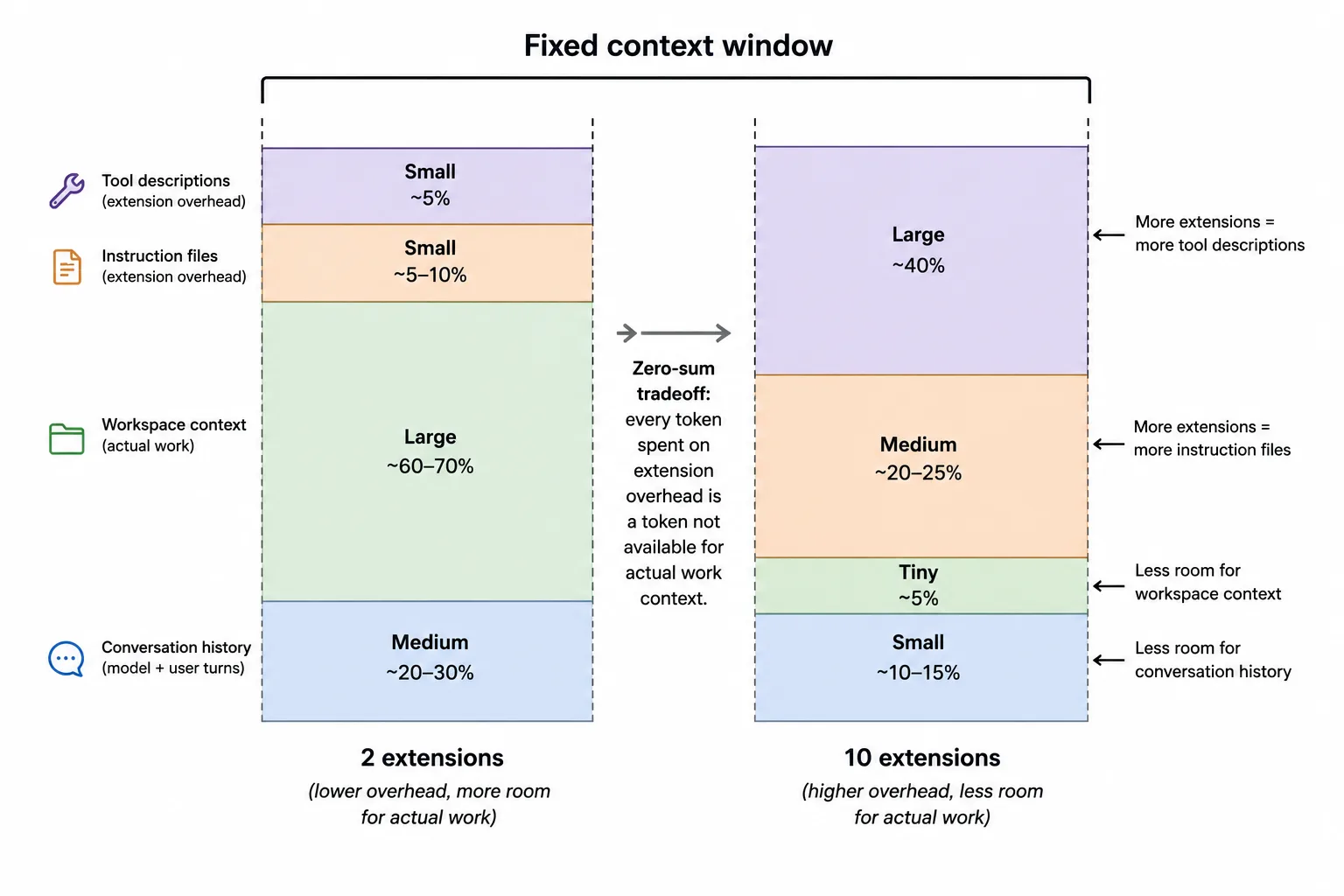
But it’s not just about space. Every token in the context changes the path the model takes. The model doesn’t process your extension’s content in isolation and then process the next one separately. It attends to everything at once. Add a database extension next to your auth extension, and both extensions produce different output than either would alone, even if they have nothing to do with each other. The mere presence of unrelated tool descriptions shifts the model’s attention and changes the output.
We’ve measured this directly: the same extension that produces consistent lift in isolation can produce drag with even one other extension present. Not because the extension changed, but because the environment around it did.
Three ways extensions conflict
Not all composition problems are about token budgets, though. Extensions can actively interfere with each other in ways that are harder to spot.
Vocabulary collisions
Two extensions describe their tools using similar language. Your tool says “manage authentication settings”, another tool says “configure identity and access.” The developer asks “set up auth for my app.” Both tools match the intent, the model picks one, and it might not be yours.
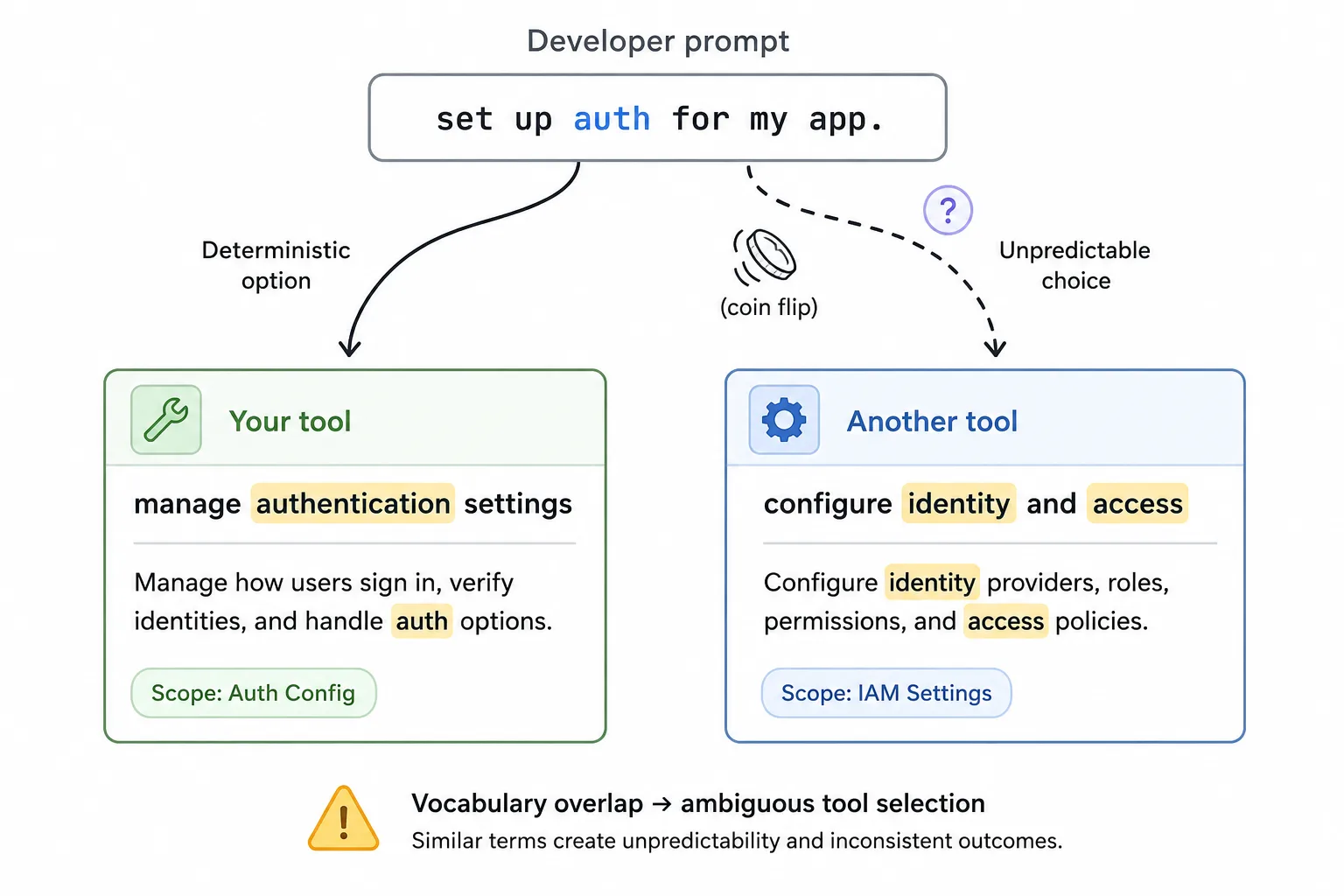
How would you even debug that? The developer sees wrong output and blames the model. But it’s not a bug in either extension, it’s an emergent property of putting two tools with overlapping vocabulary into the same context. The model doesn’t know which one the developer means, and it can’t ask (most harnesses don’t support clarifying questions for tool selection). It makes a choice based on factors you can’t see such as context position and training data associations. What’s more, that choice might change between runs.
Guidance conflicts
Extensions inject guidance through tool descriptions and skill definitions. The agent also picks up instruction files (.github/copilot-instructions.md, AGENTS.md, .instructions.md) in the repo. Both end up in the same context window, and neither knows the other exists.
The collision happens when an extension’s guidance contradicts the repo’s instructions. Your extension’s tool description says “always use the v3 SDK.” The team’s copilot-instructions.md says “we use the v2 SDK for legacy compatibility.” Which one wins? The model sees both, and the outcome depends on context ordering and phrasing strength, filtered through whatever the model’s training data says about the technology. The result is unpredictable, and it can flip between runs.
And it happens between extensions too. Two extensions that both provide guidance on authentication patterns, each assuming it’s the only authority. The model gets contradictory instructions with no way to tell which one matters.
Resource competition
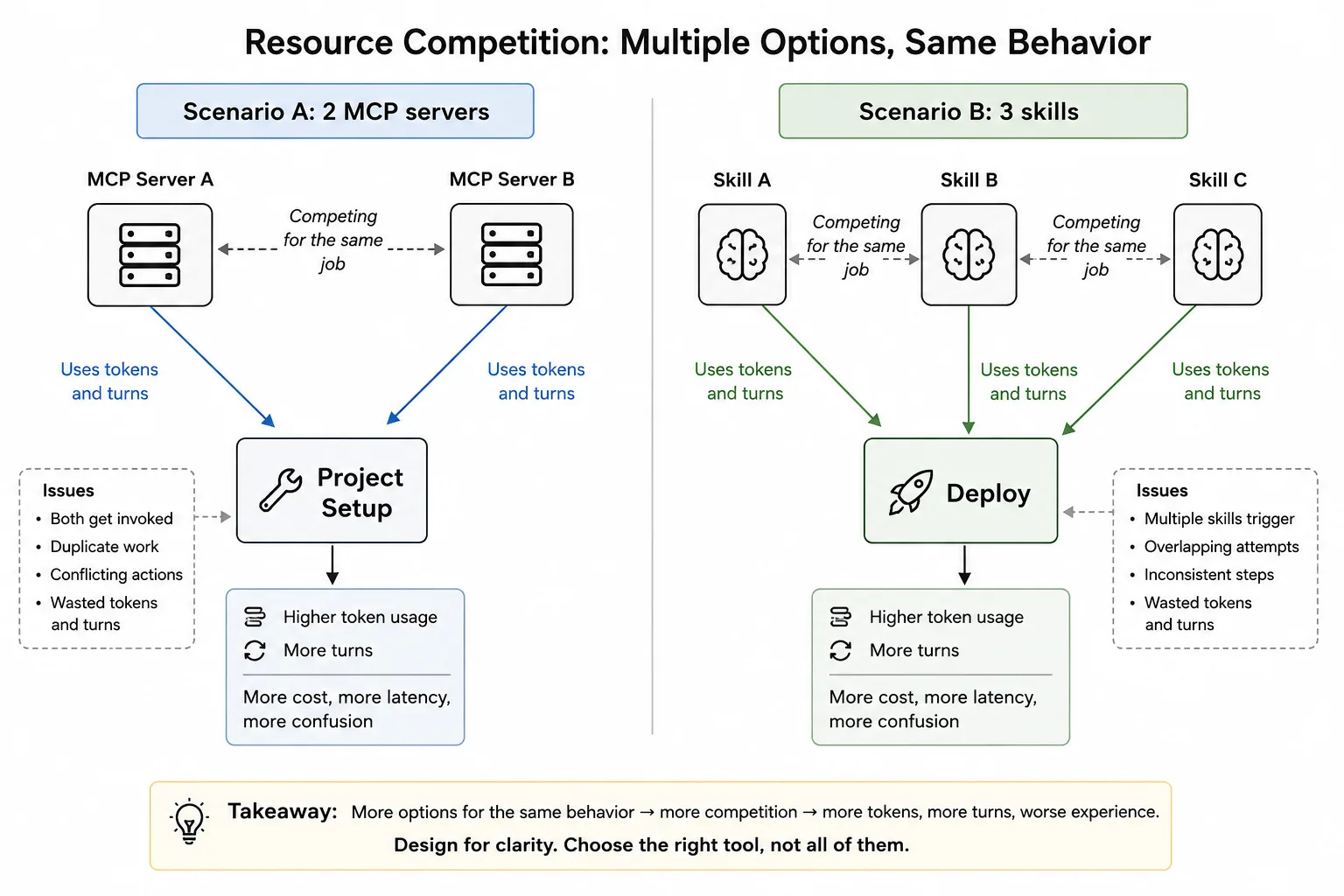
Some extensions don’t conflict semantically but compete for the same agent behavior. For example, two MCP servers that both want to be called for “project setup,” or three skills that all trigger on “deploy.” The model might call all of them (burning tokens and turns), call the wrong one, or call one and assume it covered the others.
And then there’s the subtle version: two tools return complementary but overlapping information. The model gets a detailed API reference from one tool and a quickstart guide from another. Both are accurate and relevant, but together they consume 6,000 tokens and the model has to reconcile two different framings of the same concept. It might merge them correctly, pick one and ignore the other, or get confused and generate code that mixes patterns from both leaving you with broken code.
The composition tax
Even when extensions don’t conflict at all, each one has a cost. Every installed extension takes up space in the context window and adds potential tool calls the model has to evaluate. This is the composition tax: the overhead of having extensions present, whether they’re used or not.
Here’s what that looks like in practice. You install five extensions. You ask a question that’s relevant to only one of them. The model still has to read all five tool descriptions to decide which one to call, spending tokens and processing time on four irrelevant tools. Sometimes it calls one that isn’t even relevant because its description seems related, wasting a turn and injecting irrelevant content into the context for the rest of the session.
“Install everything, let the agent figure it out” is a losing strategy. Every extension you add has a marginal cost, and past a certain threshold, the cumulative cost exceeds the benefit.
Measuring net lift
In the third article, we measured lift by comparing a baseline (no extensions) against a single extension. Composition measurement extends this to the full stack.
The additive approach
Start with your baseline (no extensions). Add one extension at a time and measure outcomes at each step:
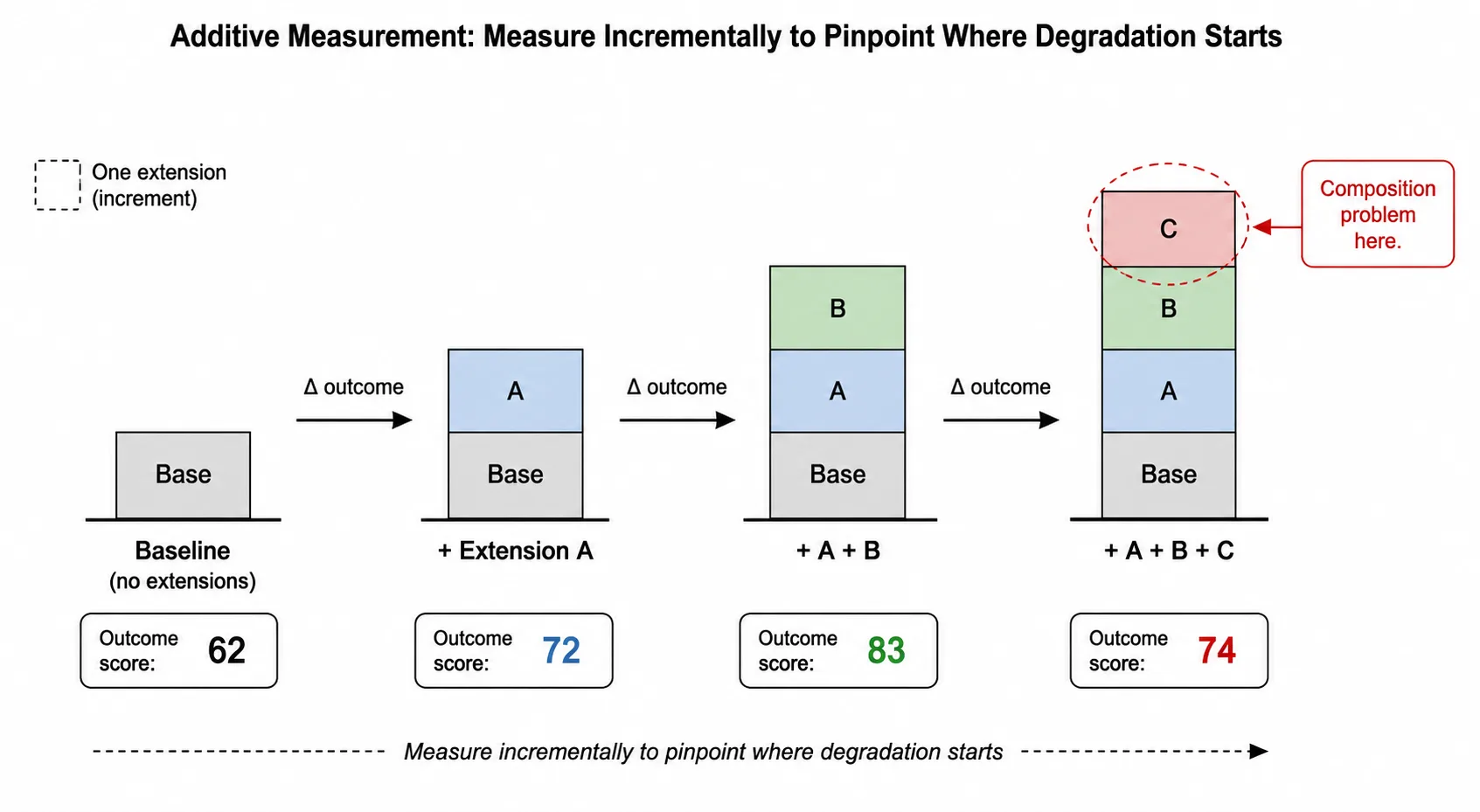
- Baseline: no extensions
- +Extension A: measure
- +Extension A +Extension B: measure
- +Extension A +Extension B +Extension C: measure
At each step, you’re asking: did outcomes improve, stay the same, or degrade, and at what cost? If adding Extension C to the stack causes outcomes to drop, you’ve found a composition problem, but you don’t yet know why.
Isolating the cause
When you see degradation, run the failing combination with one extension removed at a time:
- Extension A + Extension C (without B): does the problem persist?
- Extension B + Extension C (without A): does the problem persist?
- Extension C alone: does it produce lift?
If Extension C produces lift alone but drag when combined with Extension A, you have a pairwise conflict. If Extension C produces drag whenever the total extension count exceeds a threshold, you have a token budget problem.
The distinction matters because the fix is different. A pairwise conflict means the two extensions are interfering semantically, whether through overlapping descriptions or conflicting instructions. A token budget problem means the context window is saturated and adding anything causes degradation. You fix a conflict by changing what extensions say. You fix saturation by reducing what extensions include.
Net lift
The metric that matters for composition is net lift: the difference between your full extension stack and the baseline.
Net lift = (outcome with all extensions) – (outcome with no extensions)
Individual extensions might each produce lift in isolation, but the stack as a whole might not. If Extension A adds +15% and Extension B adds +12% individually, but together they add only +10%, you’re losing value to composition effects. If together they add +20%, you’re getting positive composition: the extensions reinforce each other.
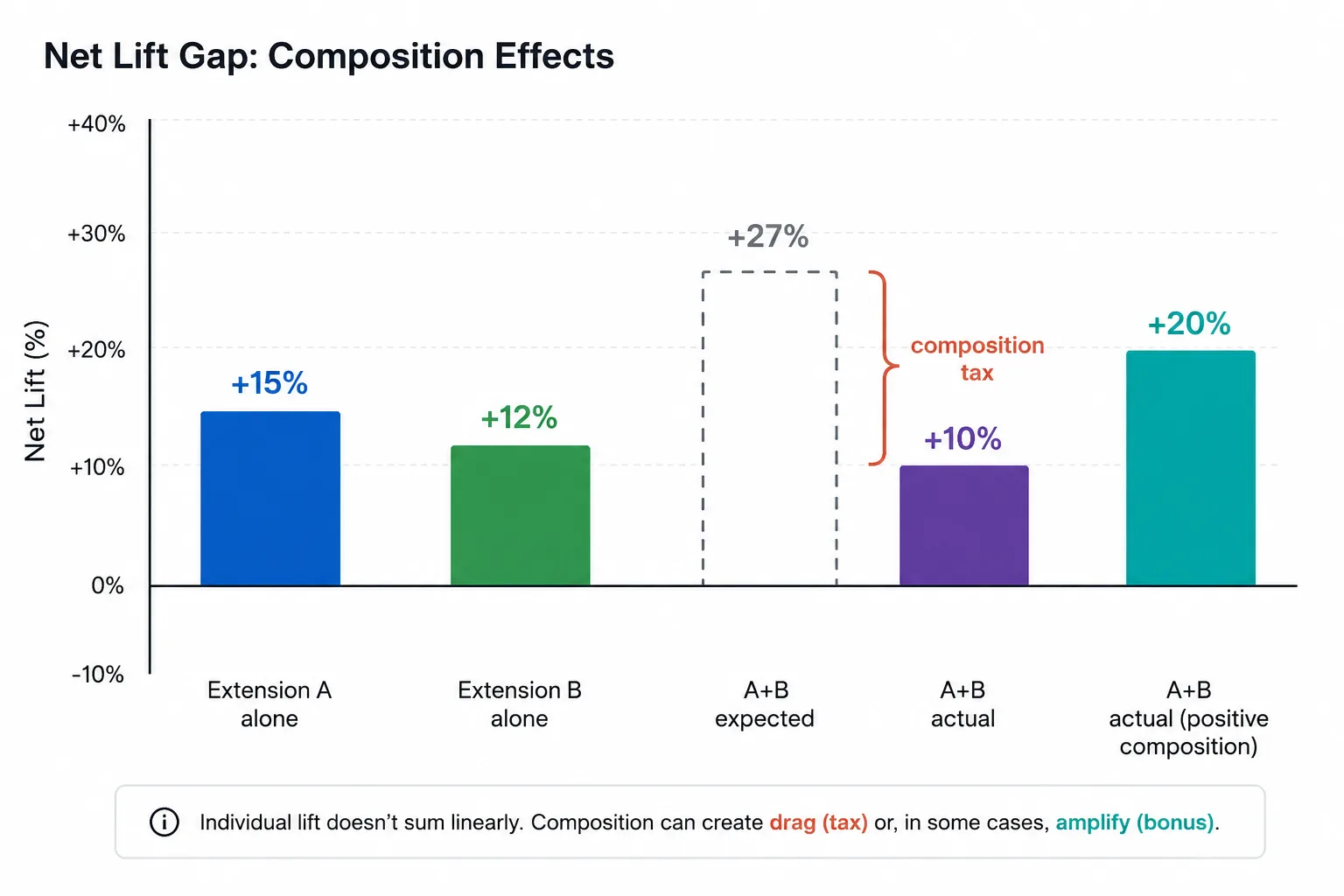
Track net lift alongside individual lift to see whether your stack is greater than, equal to, or less than the sum of its parts.
What actually helps
You don’t control other people’s extensions. But you control yours, and you influence how your users configure their workspace.
Make your extensions lean
Every token in your tool descriptions and instruction files is a token that could be used for something else. Be concise. If your tool description can convey the same intent in 50 tokens instead of 200, use 50. If your MCP server has 15 tools but only 5 are commonly used, consider splitting it so the harness only loads what’s needed. Similarly, if you provide a set of skills, that are commonly used together, bundle them into a single skill with progressive disclosure and routing instead of separate skills that each take up context.
You’d think more detail means better tool selection. It doesn’t. In a crowded context window, brevity wins. A short, precise description that actually fits in the context is infinitely better than a detailed one that gets truncated.
Use distinct vocabulary
If your tool does something that other tools also do, find language that’s specific to your technology. Instead of “manage authentication settings” (which could match 10 different tools), use your product name and specific terminology: “configure Contoso Identity PKCE flow.” The model can still match it to the intent “set up auth,” but now it has a distinguishing signal when another auth tool is present.
Test in realistic environments
Don’t evaluate your extension in isolation only. Build profiles that include the extensions your audience actually uses. If your developers typically have an Azure extension, a Docker extension, and a testing framework extension installed, test with those present. Your extension needs to produce lift in that environment, not in a clean room.
Document known conflicts
If your extension conflicts with popular tools, say so. If it works best as the only extension for a particular domain, say that too. Developers can’t fix composition problems they don’t know about.
Keep measuring
Composition is a moving target. Other extensions update their descriptions. Harnesses change how they rank tools. New extensions appear. An extension stack that works today might develop composition problems next month. Include composition testing in your regular evaluation cycle, not as a one-time check.
Summary
Extensions don’t exist alone. They share a finite context window and compete for the model’s attention, often interfering in ways invisible from the outside. More extensions don’t mean better outcomes. Past a threshold, each one costs more than it contributes.
Measure net lift across your full stack, not just individual extension impact. Keep your extensions lean enough to compose well with whatever else is installed. In the next article, we’ll look at what happens when the model has never seen your code at all: bootstrapping agent knowledge for proprietary technology with zero pre-training data.


0 comments
Be the first to start the discussion.