

If an agent isn’t doing the right thing, the obvious move is to make the docs clearer. Add a tip, spell out the correct command, describe the right approach more prominently. You do all of that, and the agent still ignores it. It does what it had already decided to do. The tip wasn’t ignored because it was unclear, it was ignored because the agent had already made its plan before it read the page.
The agent plans before it reads
An AI coding agent doesn’t arrive at your documentation as a blank slate. The moment you give it a task, it forms a plan based on what it learned during training, before it goes and fetches a single doc from your site.
We wrote about this general behaviour in Models don’t have preferences, they have context: when there’s nothing in the context to redirect a model, it falls back to whatever the statistical default is from its training data. The thing is, your docs might already be in that training data. If they are, the agent may not even bother fetching pages it thinks it already knows, it’ll only go looking for pages where it feels uncertain. And even for the pages it does fetch, they arrive into the context window after the plan has already formed, so they’re read through the lens of that existing plan. If the page complements the plan without contradicting it, the plan wins.
So when the agent reads your page and finds a tip saying “try this tool instead”, it already has an approach it’s happy with. The tip doesn’t tell it that approach is wrong, it just offers an alternative. And alternatives are optional. The agent carries on with what it was already going to do.
Sometimes that’s perfectly fine. If the agent’s plan happens to be correct, your docs just confirm it and everything works as expected. But when the plan is wrong, when the task is more complex than the training data suggests, pointing to the right approach isn’t enough. The agent has no reason to abandon something it thinks will succeed.
Don’t describe the right path, invalidate the wrong one
This is where we landed after quite a bit of trial and error: if you want to redirect an agent, you need to stop trying to make the right answer more attractive and instead tell it that its current plan will fail.
When you put language on the page that explicitly states the agent’s likely approach will result in failure, it has no choice but to abandon that approach and look for something else. Whatever you put next on the page, whether that’s a tool, a command, or the correct process, becomes what it reaches for.
Why does this work at a technical level? LLMs abandon a plan when they encounter a statement in the context that makes it impossible to succeed. A suggestion sits alongside the existing plan as one more input and the model can take it or leave it. But a statement that the plan will fail creates a constraint that can’t be satisfied without dropping that plan entirely, so the model has to find another path.
The test: a framework upgrade
We ran into this with SharePoint Framework (SPFx) project upgrades, though the shape of the problem is one that any docs author could hit: your documentation describes the correct approach, even names a tool that handles the task properly, and the agent ignores both because neither one contradicts its existing plan.
In our case, the agent’s default plan for upgrading a project was to bump the npm packages to the target version. That plan is wrong for a couple of reasons. A real SPFx upgrade changes file content and adds or removes files, it’s not just a package.json edit. On top of that, upgrading across versions isn’t a single jump. Moving from 1.21.1 to 1.22.2 is actually three separate upgrades in sequence (1.21.1 → 1.22.0 → 1.22.1 → 1.22.2), each with its own set of changes.
The CLI for Microsoft 365 knows the full sequence and handles it in one command. The docs can’t do that, each release notes page only covers upgrading from the immediately previous version. So even an agent that reads every page can’t piece together the full upgrade path from the docs alone. The CLI is genuinely the right answer here, and the docs said so.
But saying so wasn’t enough.
We started with a tip pointing to the CLI tool, including the exact command. The agent ignored it. We made the tip more direct, spelling out the benefit more clearly. Out of five runs, one used the tool. The other four carried on editing package.json manually. A tip just says “here’s something that could also help”, it never tells the agent that what it’s currently doing is wrong, so the plan survives and the tool remains optional.
Then we added a warning that explicitly named the failing approach:
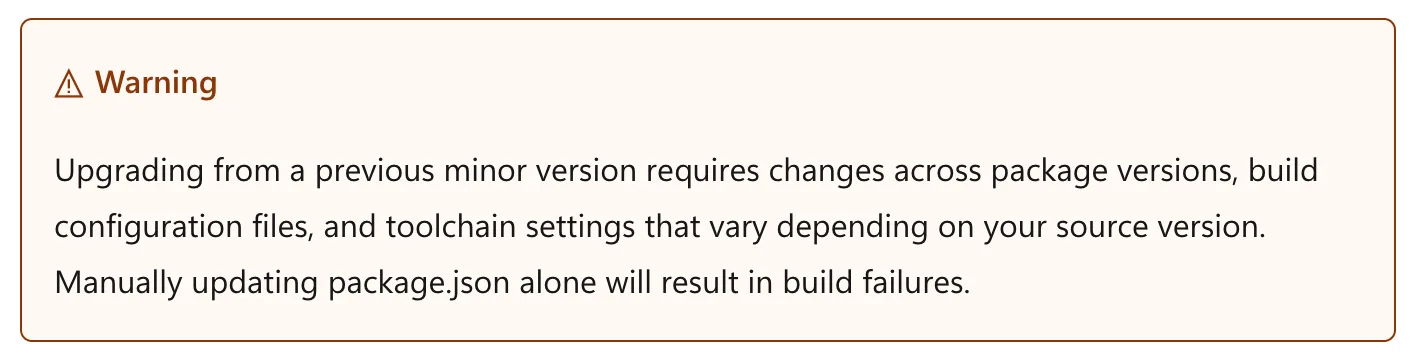
Five out of five runs used the tool.
What changed? The warning contradicted the plan directly. “Manually updating package.json alone will result in build failures” is a statement that the agent’s current approach is wrong, not a recommendation to try something different. With that approach invalidated, the agent had to form a new plan, and the CLI sitting right there on the page was the obvious next step.
How to redirect an agent that already “knows”
If an agent already “knows” how to use your technology, describing the right approach more clearly won’t make it switch. You’re not competing with a blank page, you’re competing with a plan the agent already has. What we found is that redirecting it comes down to three things:
- Work out what the agent’s default plan is for the task. What does it actually do before it reads your docs? Run it a few times and watch.
- Name that plan explicitly on the page and state that it will fail. Be specific about it, “doing X alone will result in Y” rather than vague caution that doesn’t contradict anything in particular.
- Give the correct alternative immediately after. Once the old plan is invalidated, point clearly at what it should do instead.
A couple of things worth noting here. It’s the message that does the work, not the alert type, so don’t take away from this that you should swap all your tips for warnings. We used a warning because it’s the natural place to say “this will fail”, but a vague warning that doesn’t actually name the failing plan changes nothing. The same plan-stopping sentence would work in any wrapper.
Also, use this sparingly. Reserve it for situations where the agent’s default genuinely fails. If you put plan-breaking language everywhere it becomes noise, and agents will learn to skip past it the same way they skip past everything else.
The takeaway
The instinct to make docs clearer assumes the agent is paying attention with an open mind. It isn’t, it already decided. If you want to change what it does, you need to tell it that what it’s already planning to do won’t work. Don’t describe the right path more clearly. Block the wrong one.


0 comments
Be the first to start the discussion.